Geometric Cipher (Original Algorithm)
Project Overview
The Geometric Cipher is a novel encryption algorithm that arranges text characters on regular polygons (triangles, squares, pentagons, etc.) in a spiral pattern. The cipher combines geometric positioning with optional character substitution, creating a two-layer encryption system. Characters are placed on concentric polygons and then read in a specific order to produce the ciphertext.
The final ciphertext is generated by reading the positioned characters from top to bottom, left to right - as if reading the geometric arrangement as normal text.
Core Concept
The cipher works by:
- Splitting plaintext into blocks of size
shape(number of polygon sides) - Positioning each block’s characters on a regular polygon
- Applying rotation and direction transformations
- Optionally applying a character substitution cipher
- Reading the arranged characters in geometric order to produce ciphertext
Example: Basic Cipher
geometric_cipher("Ciphertext", shape=5, starting_pos=0, clockwise=True, turn_left=True)
# Output: 'tCireepthx'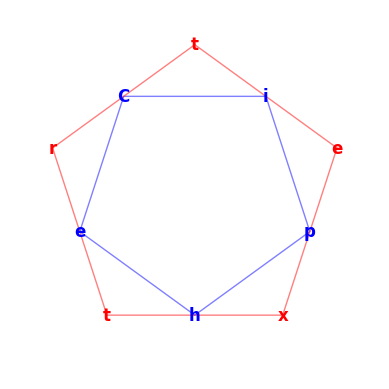
The input “Ciphertext” is arranged on a pentagon, with characters positioned at vertices. Reading from top to bottom produces the encrypted result.
Example: With Character Substitution
geometric_cipher("Ciphertext", shape=5, starting_pos=0, clockwise=True, turn_left=True, cipher=caesar_cipher)
# Output: 'uCisfepuhy'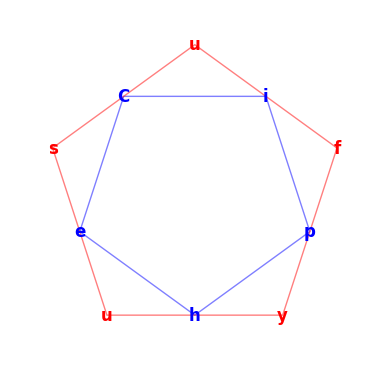
Adding caesar shifts each character by its layer number (the innermost is 0) before geometric positioning, creating a double-encrypted result that is extremely hard to break without knowing the shape.
Algorithm Details
Text Processing Pipeline
The process_text function handles the core transformation:
- Character Substitution: Apply optional cipher to the block
- Padding: Extend block to
shapelength if needed - Direction Reversal: Reverse text if
clockwise=False - Rotation: Rotate the block based on
starting_pos, block index, andturn_leftparameter - Pairing: Split characters into pairs for symmetric polygon placement
- Positioning: Calculate geometric coordinates using trigonometric functions
Coordinate Calculation
Characters are positioned using polar coordinates converted to Cartesian:
angle = π/2 + π * ((n + 1) % 2 + i * 2) / shape
radius = cos(π/shape)^(-n)
y = radius * sin(angle)
x = ±√(radius² - y²)n: Block index (determines polygon size)shape: Number of polygon sidesi: Pair index within the block
The radius grows exponentially with each block, creating concentric polygons.
Character Ordering
The cipher sorts positioned characters by their y-coordinate (descending), then reads left to right for each y-level. This creates the final ciphertext by reading the geometric arrangement as if it were normal text.
Configuration Parameters
| Parameter | Type | Default | Description |
|---|---|---|---|
shape | int | 4 | Number of polygon sides (3=triangle, 4=square, 5=pentagon, etc.) |
starting_pos | int | 0 | Initial rotation offset (0 to shape-1) |
clockwise | bool | True | Direction of character placement |
turn_left | bool | True | Rotation direction for subsequent blocks |
cipher | function | identity | Optional character substitution function |
Character Substitution Functions
Caesar Cipher Variant (caesar_cipher)
def caesar_cipher(txt, i):
    def shift_ascii(c):
        if 'A' <= c <= 'Z':
            return chr((ord(c) - ord('A') + i) % 26 + ord('A'))
        elif 'a' <= c <= 'z':
            return chr((ord(c) - ord('a') + i) % 26 + ord('a'))
        elif c.isdigit():
            return str((int(c) + i) % 10)
        return c

    return [shift_ascii(c) for c in txt]
Shifts depend on block index i, creating variable encryption strength across blocks. Supports:
- Uppercase letters (A-Z)
- Lowercase letters (a-z)
- Digits (0-9)
Decryption (caesar_decipher)
def caesar_decipher(txt, i):
    def shift_ascii(c):
        if 'A' <= c <= 'Z':
            return chr((ord(c) - ord('A') - i) % 26 + ord('A'))
        elif 'a' <= c <= 'z':
            return chr((ord(c) - ord('a') - i) % 26 + ord('a'))
        elif c.isdigit():
            return str((int(c) - i) % 10)
        return c

    return [shift_ascii(c) for c in txt]
Decryption Process
The geometric_decipher function reverses the encryption:
- Order Reconstruction: Create dummy indices to track character positions
- Geometric Positioning: Apply same transformations as encryption
- Index Mapping: Determine original position of each ciphertext character
- Reordering: Place characters back in original sequence
- Character Reversal: Apply decipher function to reverse substitution
Returns a tuple: (reordered_text, text_blocks, final_plaintext)
Example: Decryption
geometric_decipher("tCireepthx", shape=5, starting_pos=0, clockwise=True, turn_left=True)
# Output: ('Ciphertext', [['C', 'i', 'p', 'h', 'e'], ['r', 't', 'e', 'x', 't']], 'Ciphertext')

geometric_decipher("uCisfepuhy", shape=5, starting_pos=0, clockwise=True, turn_left=True, decipher=caesar_decipher)
# Output: ('Ciphesufyu', [['C', 'i', 'p', 'h', 'e'], ['s', 'u', 'f', 'y', 'u']], 'Ciphertext')
Visualization
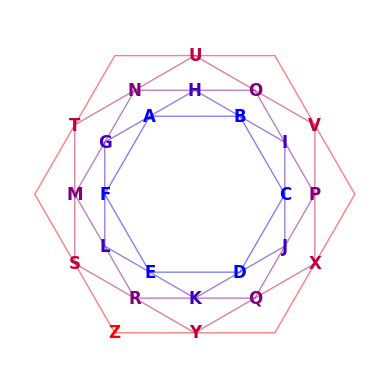
The visualize_geometric_cipher function generates matplotlib plots showing:
- Character positions on polygon vertices
- Concentric polygons for multiple blocks (color-coded by depth)
- Geometric arrangement before reading
Color Encoding:
- Blue (inner): First block (n=0)
- Gradient to red: Subsequent blocks
- Polygon transparency: 50% for edge visibility
Security Analysis
Strengths:
- Unconventional character ordering resistant to frequency analysis
- Variable encryption with block-dependent transformations
- Customizable parameters increase keyspace
- Optional layered encryption (geometric + substitution)
Weaknesses:
- Deterministic algorithm vulnerable to known-plaintext attacks
- Geometric positioning patterns may be recognizable with multiple samples
Use Cases
- Educational cryptography demonstrations
- Artistic text encoding
- Low-security obfuscation for puzzles/games
- Steganographic applications (embed in geometric art)
Example Applications
Short Message
geometric_cipher("Hello", shape=5, starting_pos=2, clockwise=False, turn_left=False)
# Output: 'lloeH'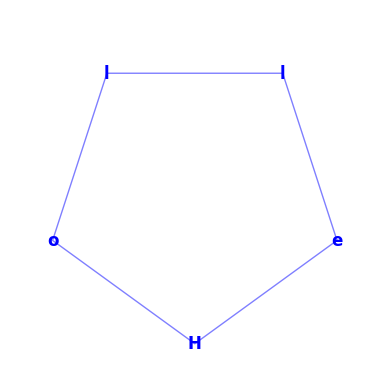
Long Text
geometric_cipher("The quick brown fox jumps over the lazy dog", shape=6, starting_pos=1, clockwise=True, turn_left=True, cipher=caesar_cipher)
# Output: 'j uzxinpl jqhempd  syT hvgjc suqm qsq aweyf'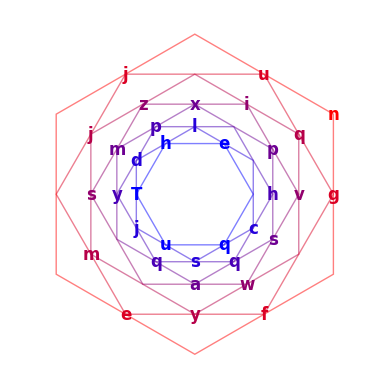
Custom Shape
geometric_cipher("Octagon", shape=8, starting_pos=0, clockwise=True, turn_left=True)
# Output: 'Octnaog'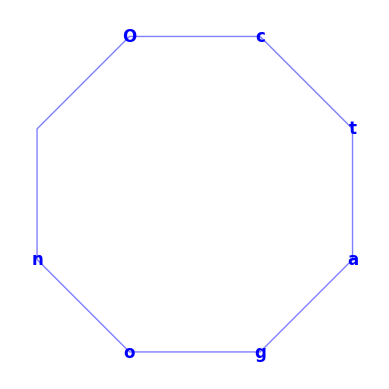
Implementation Notes
- Uses Python’s
mathlibrary for trigonometric calculations - Matplotlib required for visualization (
matplotlib.pyplot,matplotlib.patches) - Floating-point rounding to 10 decimal places prevents coordinate drift
- Handles odd-length blocks by placing center character at polygon center
Conclusion
The Geometric Cipher demonstrates how spatial transformations can create encryption beyond traditional character substitution. While not cryptographically secure for sensitive data, it provides an intuitive visualization of how geometric mathematics can encode information. The customizable parameters and optional substitution layer make it a flexible tool for educational purposes and creative text obfuscation.